
How to Create and Manage Multiple TikTok Accounts in 2026: Phone Verification and Antidetect Browsers
Contents
1. Why Use a Virtual Number for TikTok Verification?
2. Prepare Your Device and Account Information
Check TikTok's age and account requirements
Prepare your registration details
Plan how to separate multiple accounts
3. Get a Temporary Phone Number Through TIGER SMS
4. How to Create Multiple TikTok Accounts with Virtual Numbers in BitBrowser
What If the Verification Code Does Not Arrive?
5. Prevent Multiple TikTok Account Association with an Anti-Detect Browser
How BitBrowser Helps with Multi-Account Isolation
Why Does Browser Fingerprint Isolation Matter?
6. Use Cloud Phones for TikTok Mobile Multi-Account Management
How BitCloudPhone Supports Multiple TikTok Accounts
7. Best Practices for Secure Multi-Account Management
Keep registration information organized
Assign a separate environment to each account
Protect account recovery methods
Can I create a TikTok account without my personal phone number?
Can I use one virtual number for multiple TikTok accounts?
Does an anti-detect browser prevent TikTok accounts from being associated?
Can I manage multiple TikTok accounts on one computer?
Is a cloud phone better than an anti-detect browser for TikTok?

Creating multiple TikTok accounts can be useful for social media marketers, content creators, businesses, and agencies managing different brands or clients. However, registering several accounts is only the first step. Each account also needs its isolated login information, verification method, and browsing or mobile environment.
Using a virtual phone number can help keep your personal number separate from the registration process. Meanwhile, an anti-detect browser helps prevent multi-account association by isolating browser fingerprints, cookies, and other browsing data. For mobile-based workflows, cloud phones provide separate mobile environments for managing TikTok accounts.
In this guide, we will explain how to create multiple TikTok accounts using virtual number verification through TIGER SMS, how to prevent account association with BitBrowser, and when cloud phones can make multi-account management easier.
1. Why Use a Virtual Number for TikTok Verification?
TikTok provides several registration methods, including phone number, email, and supported third-party login options. If you prefer not to use your personal phone number, a virtual number can be an alternative for receiving SMS verification codes.
Here are some common reasons to use a virtual number:
-
Keep your personal number private: Avoid sharing your everyday phone number when registering another account.
-
Separate account registration details: Use different contact information for accounts associated with different projects or businesses.
-
Receive SMS codes online: Access verification messages through an online dashboard without inserting another physical SIM card.
-
Simplify multi-account registration: Manage phone verification for different accounts without relying on one personal number.
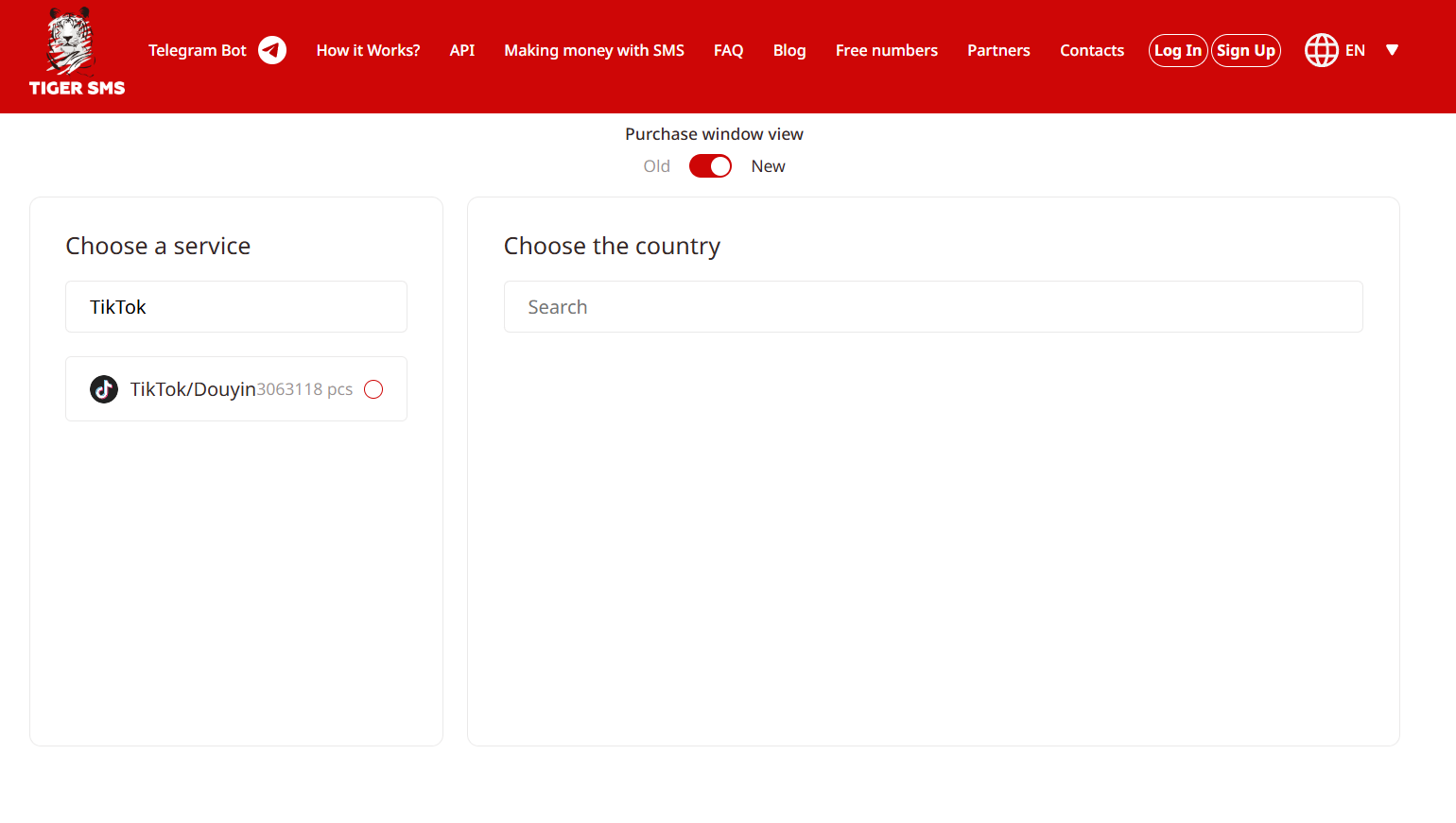
Services such as TIGER SMS provide temporary virtual numbers for receiving SMS verification codes from supported platforms. Users can select an available country and service, obtain a number, and check incoming messages through their dashboard.
2. Prepare Your Device and Account Information
Before creating a TikTok account, prepare your registration details and decide how you will manage the account afterward.
Check TikTok's age and account requirements
TikTok has minimum age requirements for account registration, while features such as LIVE and monetization may have additional eligibility conditions. Enter your actual date of birth and check the requirements that apply to your account and region.
Completing phone verification does not automatically unlock every TikTok feature. Some services may require additional identity or eligibility checks.
Prepare your registration details
It is useful to have the following information ready:
-
A phone number or email address supported by TikTok.
-
A secure password that is not reused across accounts.
-
A username that is available.
-
An accessible recovery email or another supported login method.
-
Profile information appropriate for your account.
Plan how to separate multiple accounts
If you intend to manage several TikTok accounts, think about account separation before registering them all on the same device or browser.
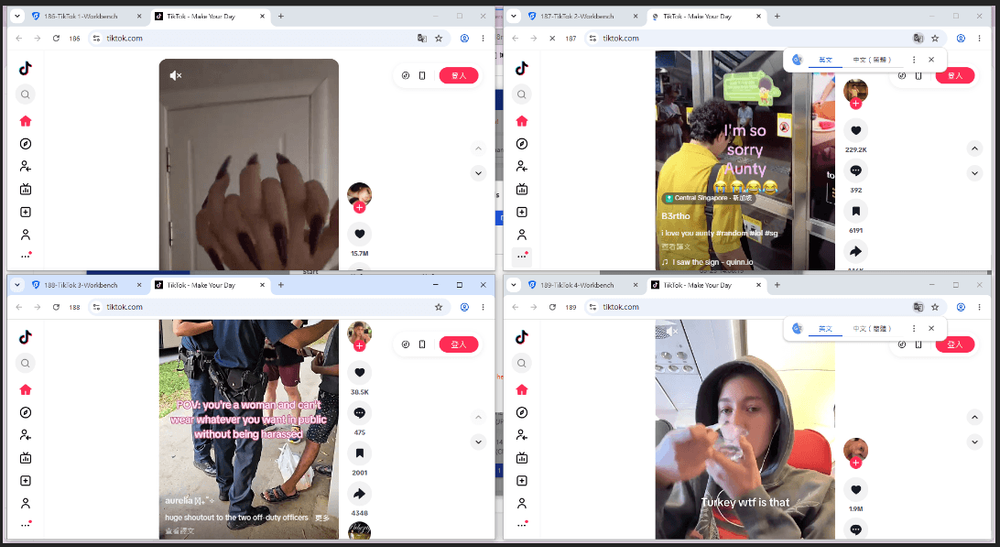
Using one browser environment for every account can cause cookies, local storage, and login sessions to overlap. This makes account management less organized and can increase the risk of accounts being associated through shared browser data.
An anti-detect browser or cloud phone can help create separate environments for different accounts. We will cover these options in detail below.
3. Get a Temporary Phone Number Through TIGER SMS
If you choose phone registration, you can use TIGER SMS to obtain an available number for receiving a verification code.
Follow these steps:
1. Visit TIGER SMS and create an account.
2. Log in to your dashboard.
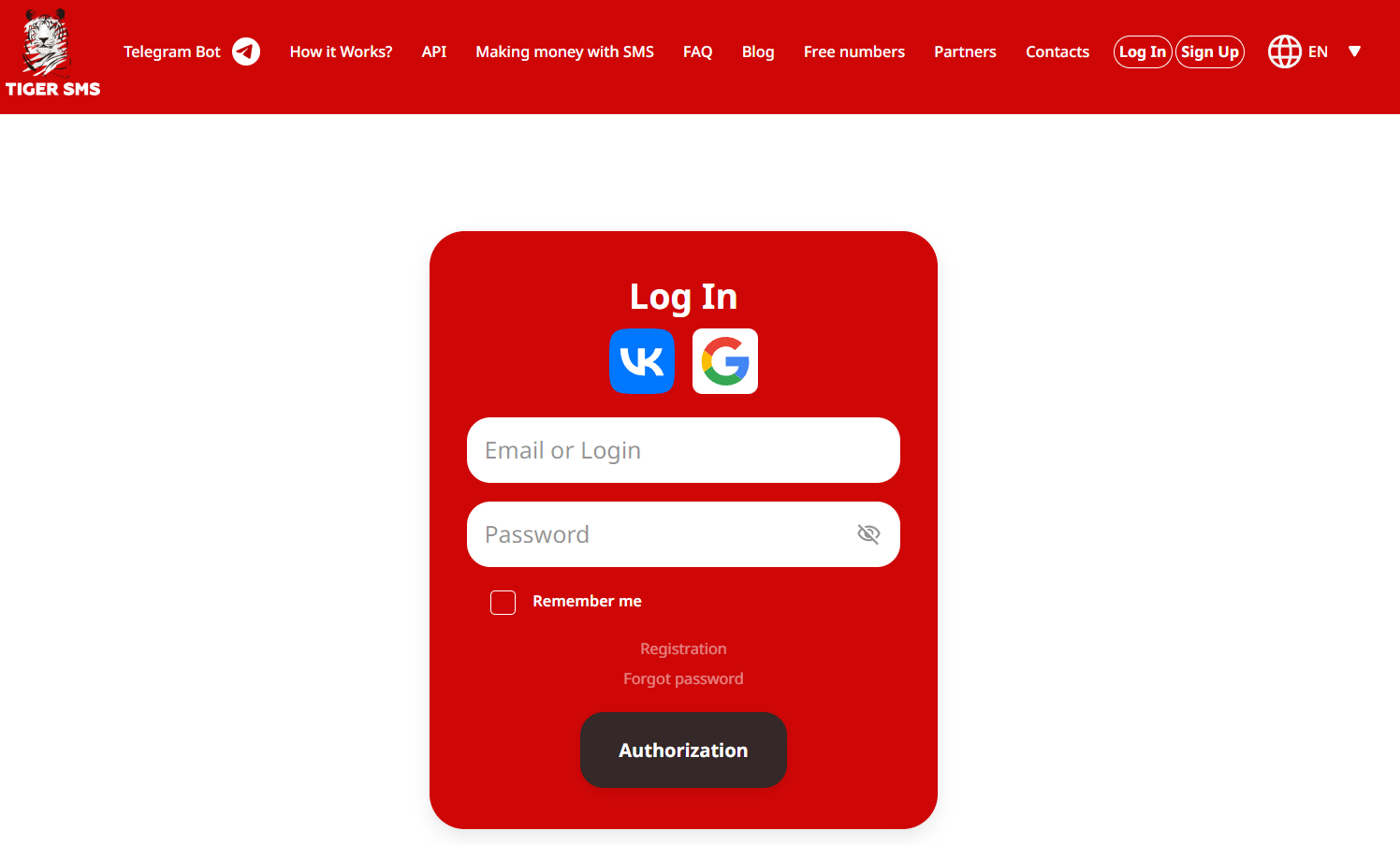
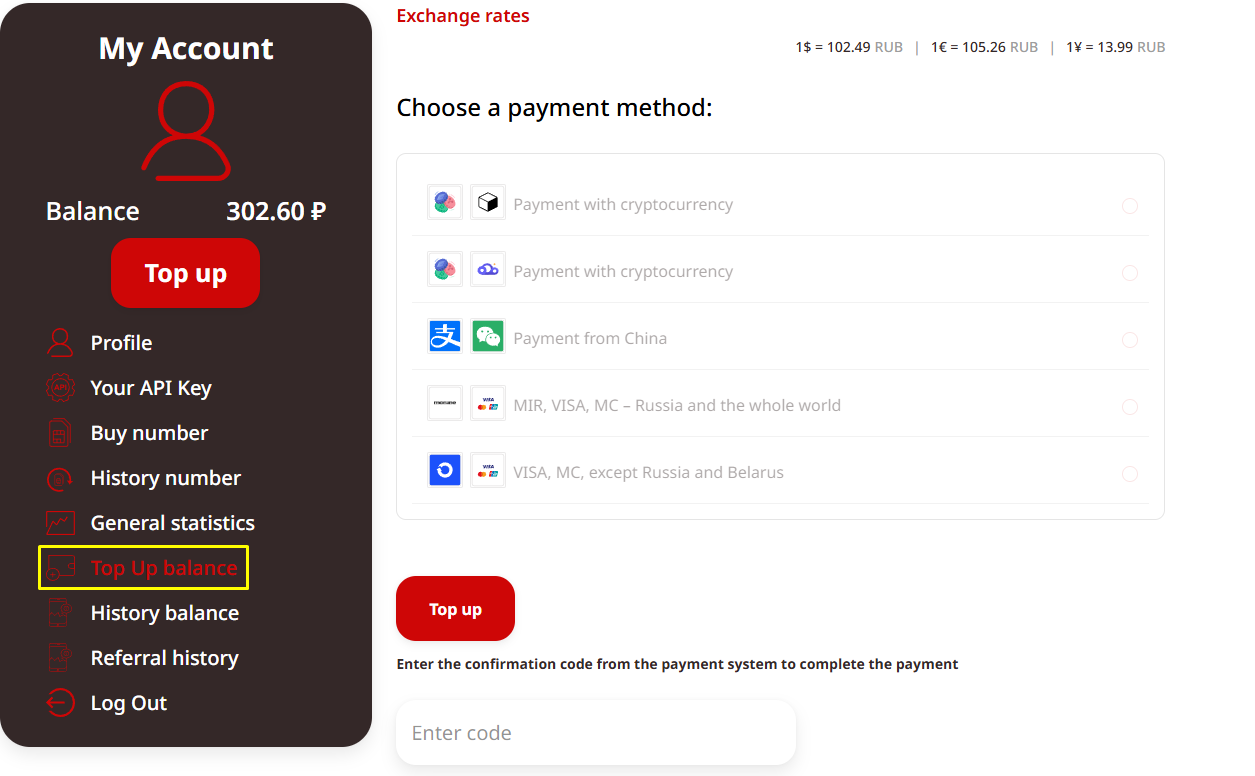
3. Add funds to your balance if required.
4. Find TikTok in the list of supported services.
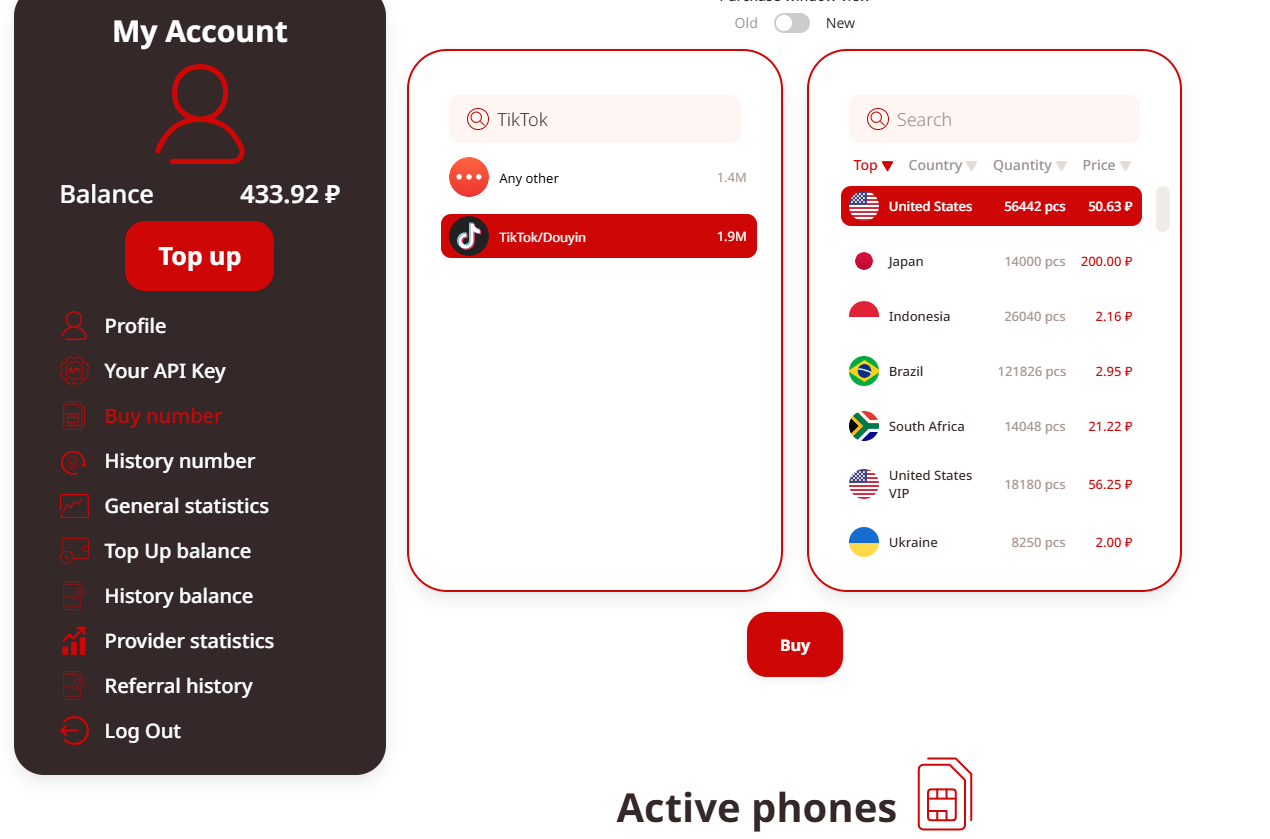
5. Select a country where numbers are available.
6. Purchase an activation and wait for the assigned number to appear in your dashboard.
Once the number is available, keep the dashboard open so you can check for incoming SMS messages.
The availability of numbers and successful delivery of verification codes can vary. A number being listed does not guarantee that TikTok will accept it. If a code does not arrive, check the activation status and number details before requesting another code.
4. How to Create Multiple TikTok Accounts with Virtual Numbers in BitBrowser
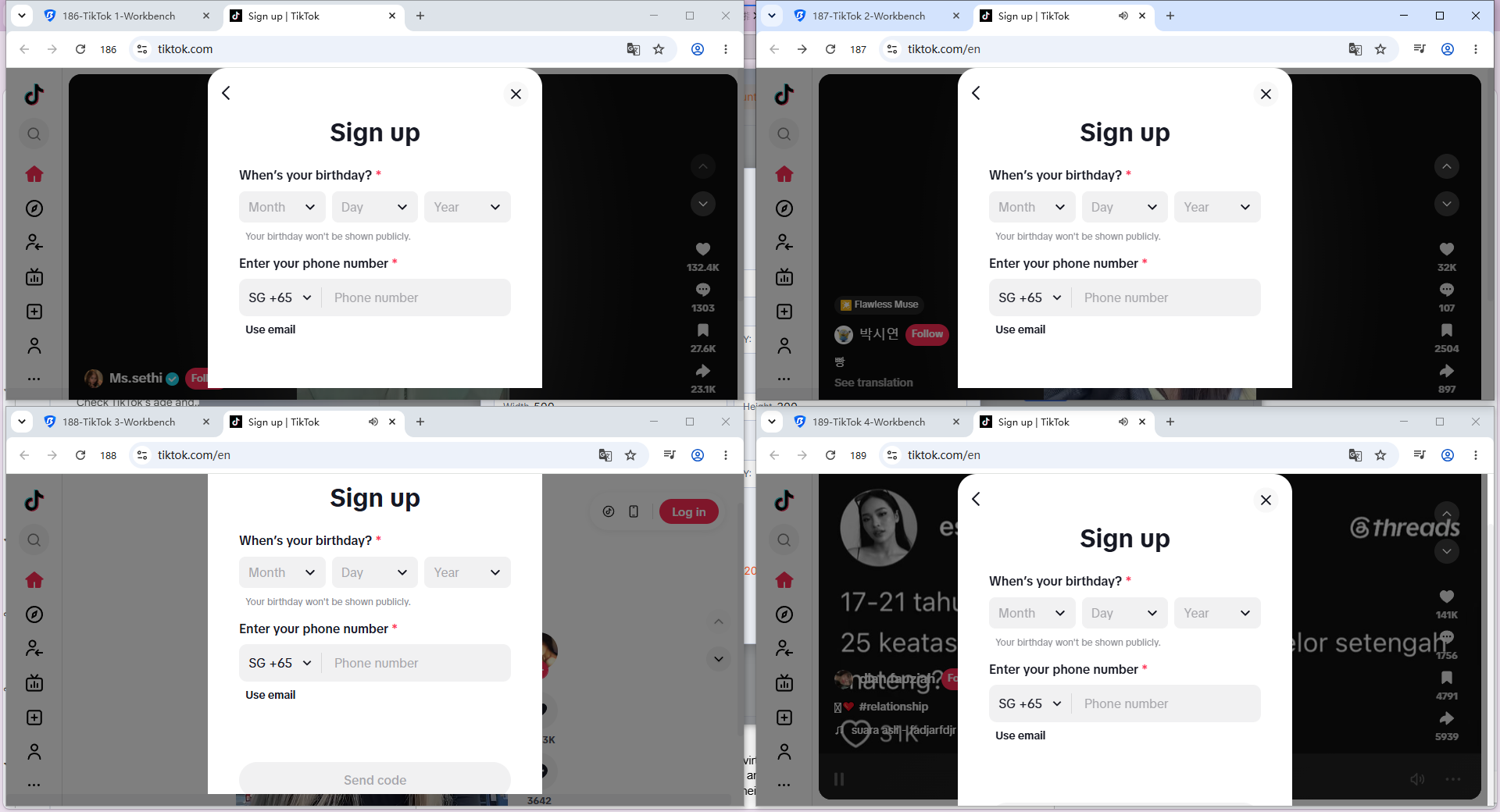
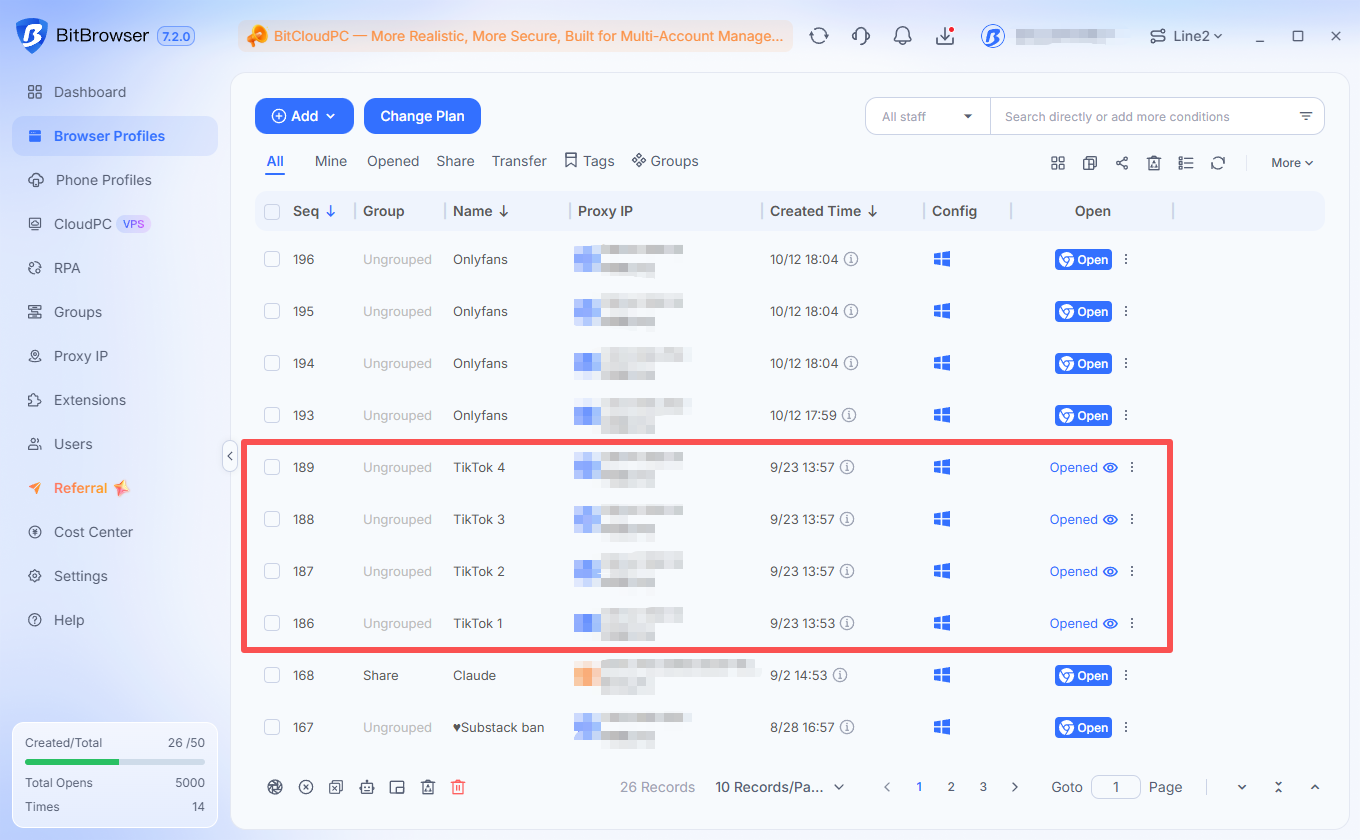
After obtaining virtual numbers from TIGER SMS, you can register multiple TikTok accounts in BitBrowser. Each account should have its own browser profile to keep its browser fingerprint, proxy, cookies, and login data separate.
Follow these steps:
1. Open BitBrowser: Launch BitBrowser on your computer and sign in to your account.
2. Create browser profiles: Create a separate anti-detect browser profile for each TikTok account you plan to register.
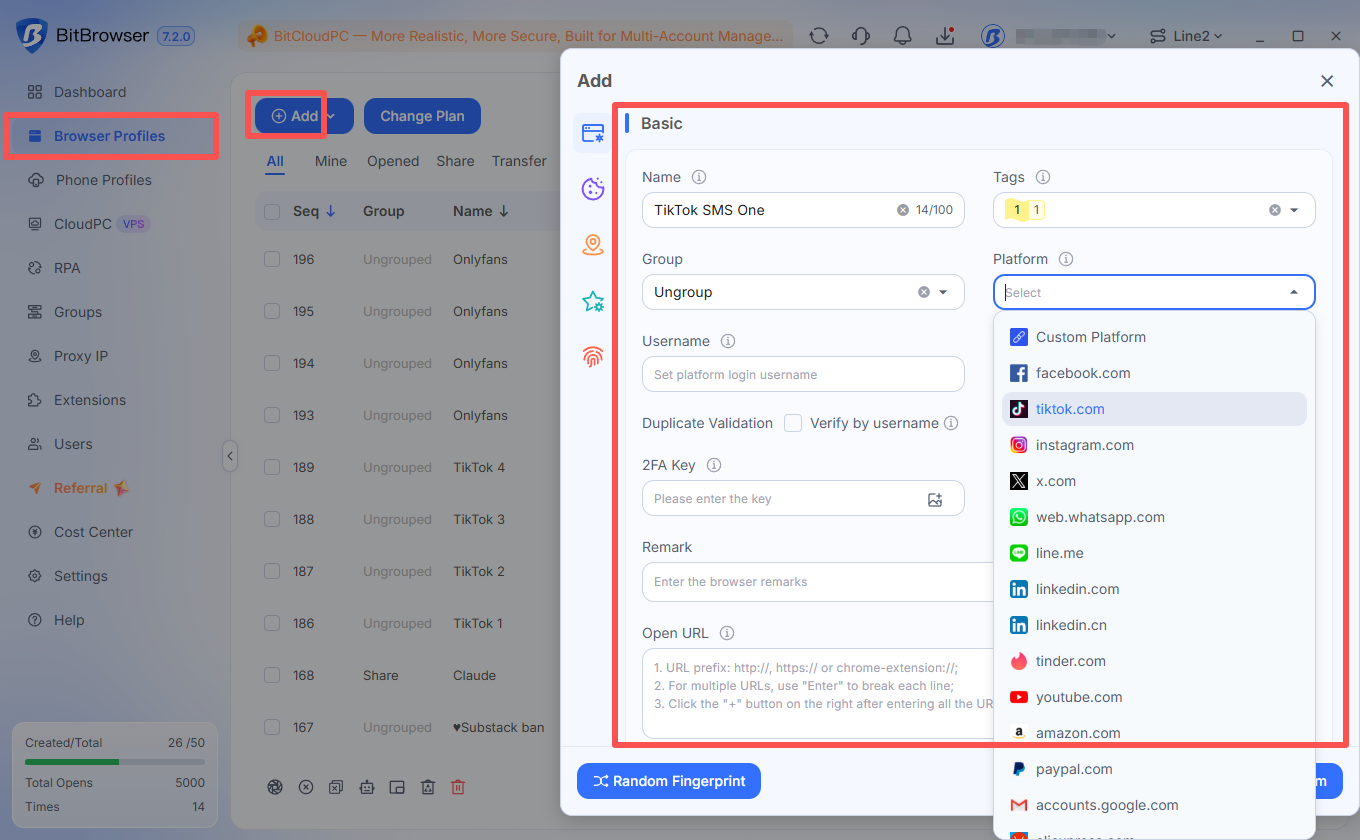
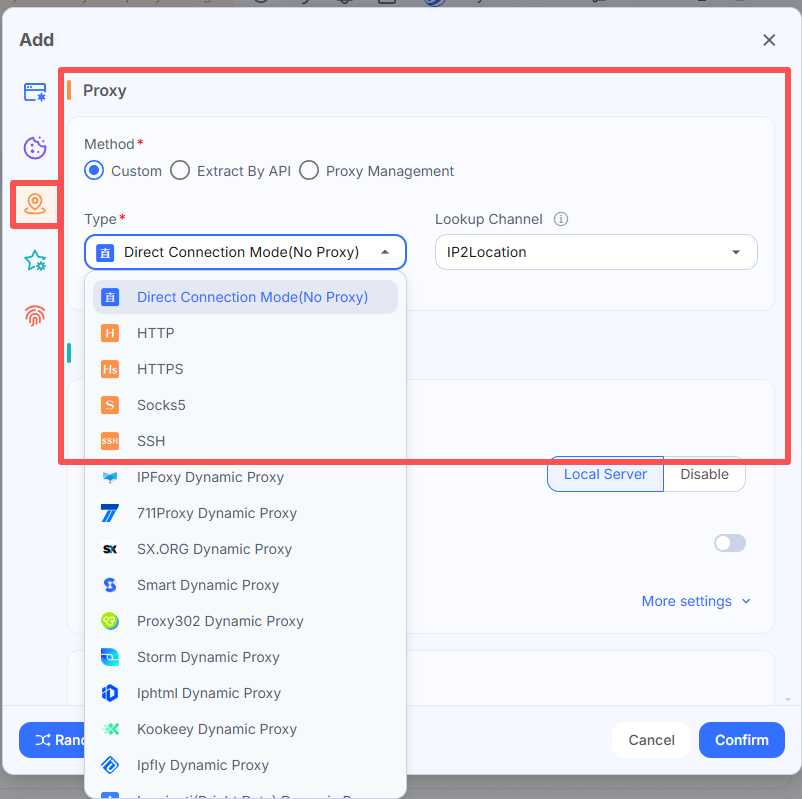
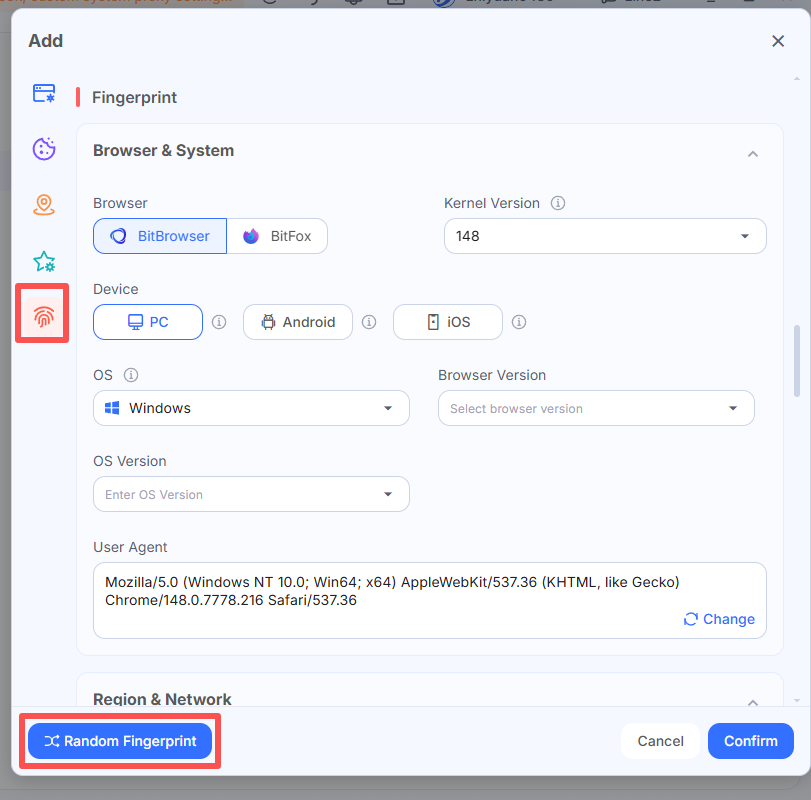
3. Configure each profile: Set a unique browser fingerprint and assign a separate proxy to each profile. Make sure the browser's time zone and language settings are consistent with the proxy's geographic location.
4. Launch a profile: Open the newly created profile to access its independent browsing environment.
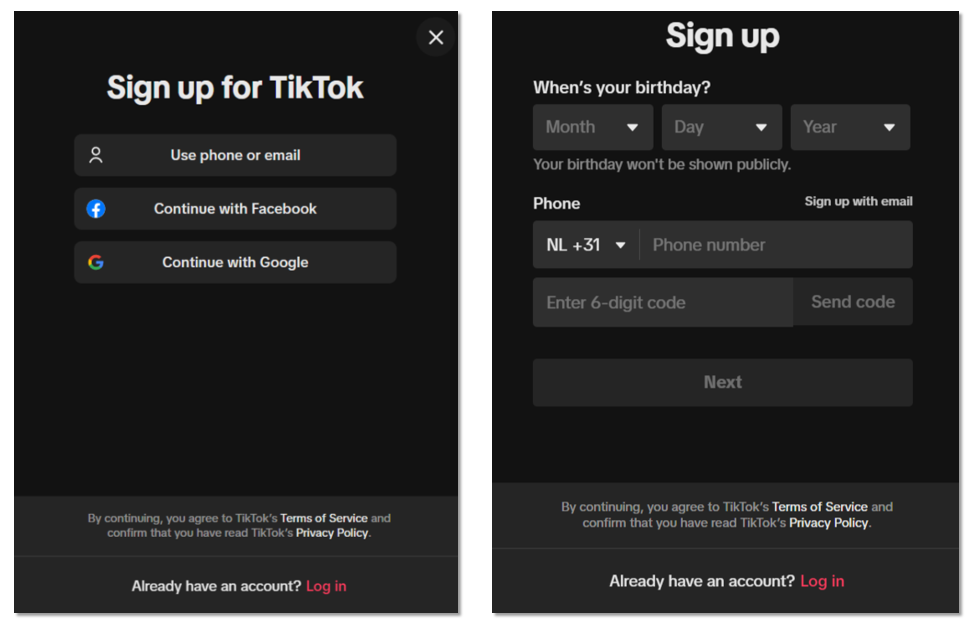
5. Visit TikTok: Go to the official TikTok website and select Sign up.
6. Choose phone registration: Select the phone registration option if available, then choose the appropriate country code.
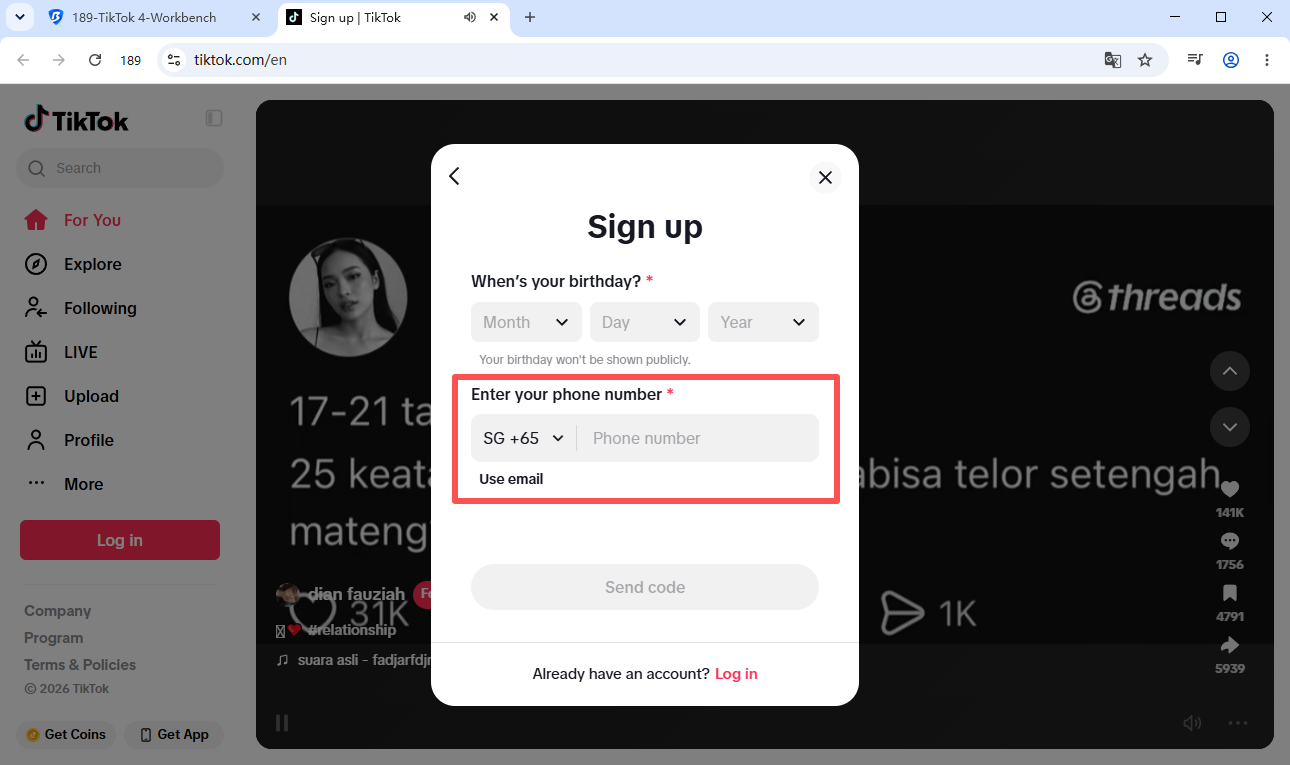
7. Enter your virtual number: Copy a number from your TIGER SMS dashboard and enter it on TikTok.
8. Retrieve the verification code: Return to your TIGER SMS dashboard and wait for the incoming SMS code.
9. Complete verification: Enter the code on TikTok to verify your phone number.
10. Finish registration: Enter your actual date of birth, create a secure password, choose a username, and complete the remaining profile information.
To create additional accounts, repeat the process using a different BitBrowser profile, proxy, and virtual number for each registration.
Keep each account linked to its original BitBrowser profile for subsequent logins. This helps maintain separate browser fingerprints, cookies, and login sessions, making multiple TikTok accounts easier to manage from one computer.
What If the Verification Code Does Not Arrive?
If you do not receive the SMS code, check the following:
-
Confirm that the country code and phone number are correct.
-
Check whether the TIGER SMS activation is still active.
-
Make sure the selected number supports TikTok verification.
-
Wait briefly before requesting another code.
-
Check whether TikTok requires additional verification.
Avoid repeatedly requesting codes within a short period, as this may trigger additional checks or temporary restrictions.
5. Prevent Multiple TikTok Account Association with an Anti-Detect Browser
Managing multiple TikTok accounts in the same browser can cause cookies, login sessions, local storage, and browser fingerprint data to overlap. An anti-detect browser helps keep these environments separate by assigning each account its own browser profile.
How BitBrowser Helps with Multi-Account Isolation
BitBrowser allows users to create and manage multiple browser profiles, each with configurable fingerprint settings and independent proxy configurations.
Key features include:
-
Browser fingerprint isolation: Configure separate fingerprint parameters for each profile.
-
Cookie and session isolation: Keep cookies, local storage, and login sessions separate.
-
Independent proxies: Assign different proxy settings to individual profiles.
-
Profile management: Create, organize, and manage multiple accounts from one application.
-
Team collaboration: Share selected profiles and manage team permissions.
-
Automation tools: Use Synchronizer, RPA, and Local API for repetitive browser tasks.
For example, a social media agency can assign each client's TikTok account to a dedicated BitBrowser profile, keeping its browser data and proxy settings separate.
Why Does Browser Fingerprint Isolation Matter?
A browser fingerprint consists of browser and device characteristics, such as browser version, operating system, and screen settings. Websites may use these signals to recognize browsing environments.
Using separate profiles helps prevent different accounts from sharing the same browser data and makes multi-account management easier.
6. Use Cloud Phones for TikTok Mobile Multi-Account Management
An anti-detect browser helps manage TikTok accounts through desktop browsers, but some workflows require the TikTok mobile app. Cloud phones provide a separate mobile environment for these tasks.
What Is a Cloud Phone?
A cloud phone is a remotely hosted mobile device that can be accessed from a computer. It allows users to install and run mobile apps without maintaining multiple physical phones. Each cloud phone has its own app data, login sessions, and network settings.
How BitCloudPhone Supports Multiple TikTok Accounts
BitCloudPhone lets users manage multiple cloud phones from a PC, with separate mobile environments for different accounts.
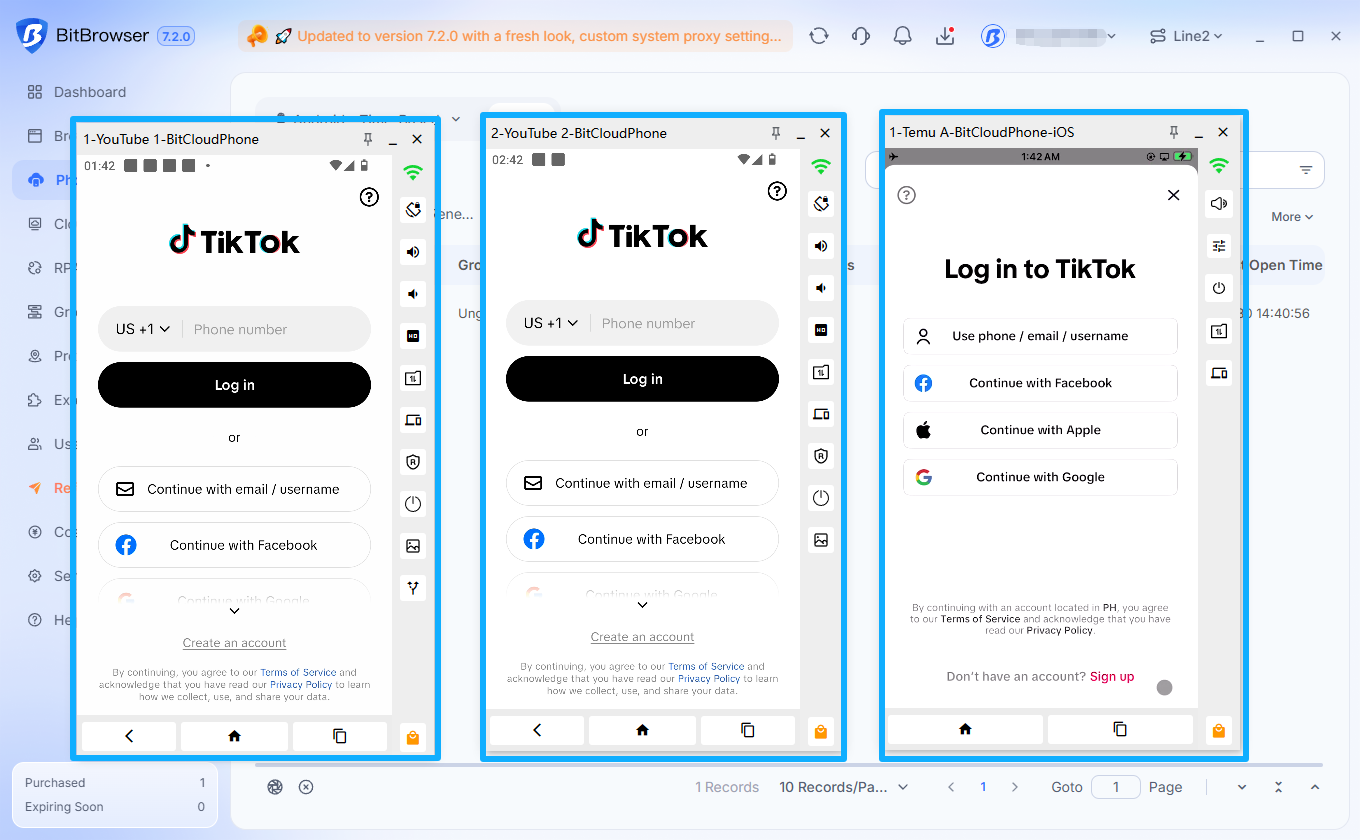
Key benefits include:
-
Account isolation: Assign each TikTok account to a separate cloud phone.
-
Independent app data: Keep app data and login sessions separate.
-
Multiple device management: Operate several cloud phones from one computer.
-
Mobile workflows: Handle app-based tasks without repeatedly switching accounts on one device.
-
Team collaboration: Organize cloud phone access across projects and team members.
For example, a social media team can assign each TikTok account to a different cloud phone, keeping its app data and login session separate.
An anti-detect browser isolates desktop browser environments, while a cloud phone provides isolated mobile app environments. You can choose either solution or combine them depending on your workflow.
7. Best Practices for Secure Multi-Account Management
Using virtual numbers, anti-detect browsers, and cloud phones can make account management more organized. However, the tools work best when combined with good account security practices.
Keep registration information organized
Record the phone number, email address, and recovery method associated with each account. Store credentials securely and avoid reusing the same password across multiple accounts.
Assign a separate environment to each account
Use a dedicated anti-detect browser profile for each desktop account or a separate cloud phone for each mobile account. Give every environment a clear name so you can identify the correct account quickly.
Configure proxies carefully
If your workflow requires proxies, assign and manage them consistently. Avoid unnecessary changes to network settings, and do not use proxy configurations to misrepresent your identity or bypass platform eligibility requirements.
Limit team access
Only share browser profiles and cloud phones with team members who need them. Review permissions when someone changes roles or leaves a project.
Protect account recovery methods
Temporary numbers may not remain available indefinitely. For important accounts, maintain an accessible recovery email or another supported recovery method. Review login activity and update security information when necessary.
Use automation responsibly
Synchronization, RPA, and API tools can reduce repetitive work when managing multiple accounts. However, automation should comply with TikTok's terms and should not be used for spam, artificial engagement, or other prohibited activities.
Frequently Asked Questions
Can I create a TikTok account without my personal phone number?
Yes. Depending on the registration options available to you, you may be able to sign up using an email address or a virtual phone number. A service such as TIGER SMS can provide temporary numbers for receiving SMS verification codes from supported services. TikTok may still require additional verification.
Can I use one virtual number for multiple TikTok accounts?
Whether a phone number can be reused depends on TikTok's current registration and verification rules. A number that has already been associated with an account may not be accepted for another registration. Check the platform's requirements before attempting to reuse a number.
Does an anti-detect browser prevent TikTok accounts from being associated?
An anti-detect browser helps prevent association through shared browser environments by isolating browser fingerprints, cookies, local storage, and proxy settings across profiles. However, it cannot guarantee that accounts will never be associated, since platforms may evaluate other information and activity signals.
Can I manage multiple TikTok accounts on one computer?
Yes. You can use an anti-detect browser such as BitBrowser to create and manage multiple browser profiles on one computer. If your workflow depends on the mobile app, cloud phones provide another option for managing separate mobile environments.
Is a cloud phone better than an anti-detect browser for TikTok?
They serve different purposes. An anti-detect browser is designed for desktop browsing environments and browser fingerprint isolation. A cloud phone provides a separate mobile environment for app-based workflows. The right option depends on whether you primarily use TikTok through a browser or its mobile app.
Conclusion
Creating multiple TikTok accounts involves more than receiving SMS verification codes. You also need to organize registration details, protect login information, and keep different account environments separate.
A virtual number from TIGER SMS can help keep your personal phone number separate during registration. After verification, an anti-detect browser such as BitBrowser helps prevent multi-account association by isolating browser fingerprints, cookies, and proxy settings across profiles. For mobile workflows, BitCloudPhone provides separate cloud phone environments for app-based account management.
By combining virtual number verification with anti-detect browser profiles or cloud phones, you can build a more organized approach to multi-account security, isolation, and daily management.